Manage members and preferences
Workspace members
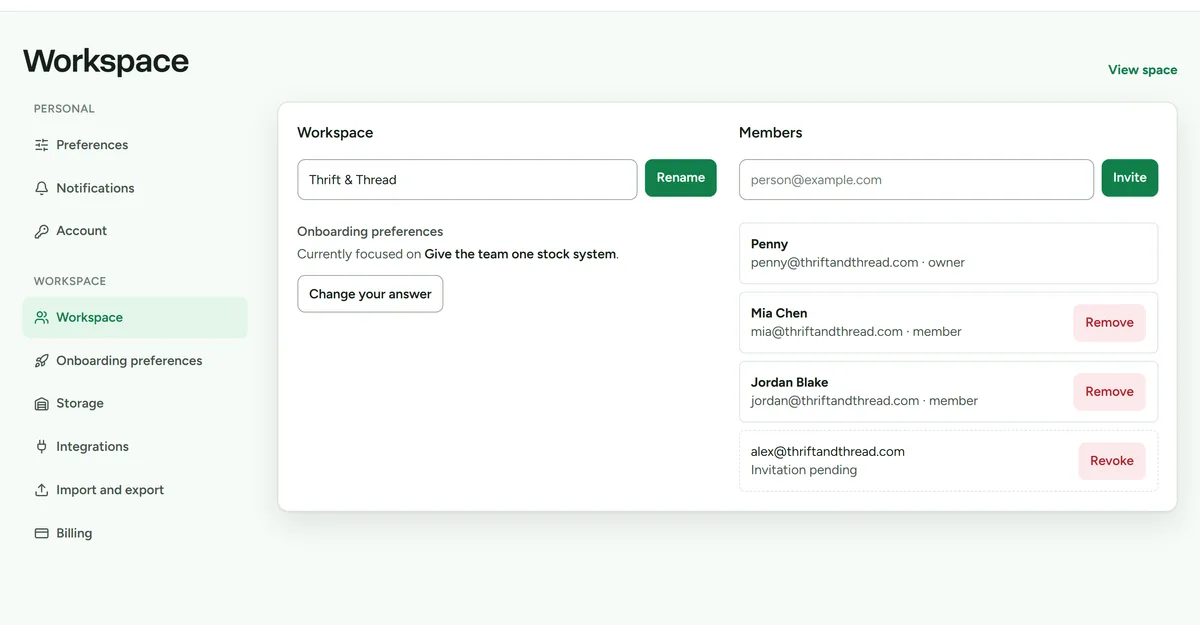 Workspace settings, where members and roles are managed.
Only the workspace owner can manage membership.
- Open Settings > Workspace.
- Review the current members and pending invitations.
- Invite a member using the email address they will use for Deathpile.
- Remove access when a person no longer works in the workspace.
Workspace inventory, progress, and achievements are shared. Personal preferences and notification choices belong to each signed-in member.
Display preferences
Open Settings > Preferences to choose personal display behaviour. Stock and other lists also remember card or table preference in the current browser.
Notifications
- Open Settings > Notifications.
- Choose the weekly recap, optional streak reminders, timezone, and related preferences you want.
- Allow browser notification permission only if you want background Web Push.
Notifications are off until each member opts in. Quiet hours run from 21:00 to 08:00 in the selected timezone.