Pick and dispatch stock
Pick covers two jobs in one run: confirmed sales that still need collecting, and a personal list you build from Stock without changing quantity in advance.
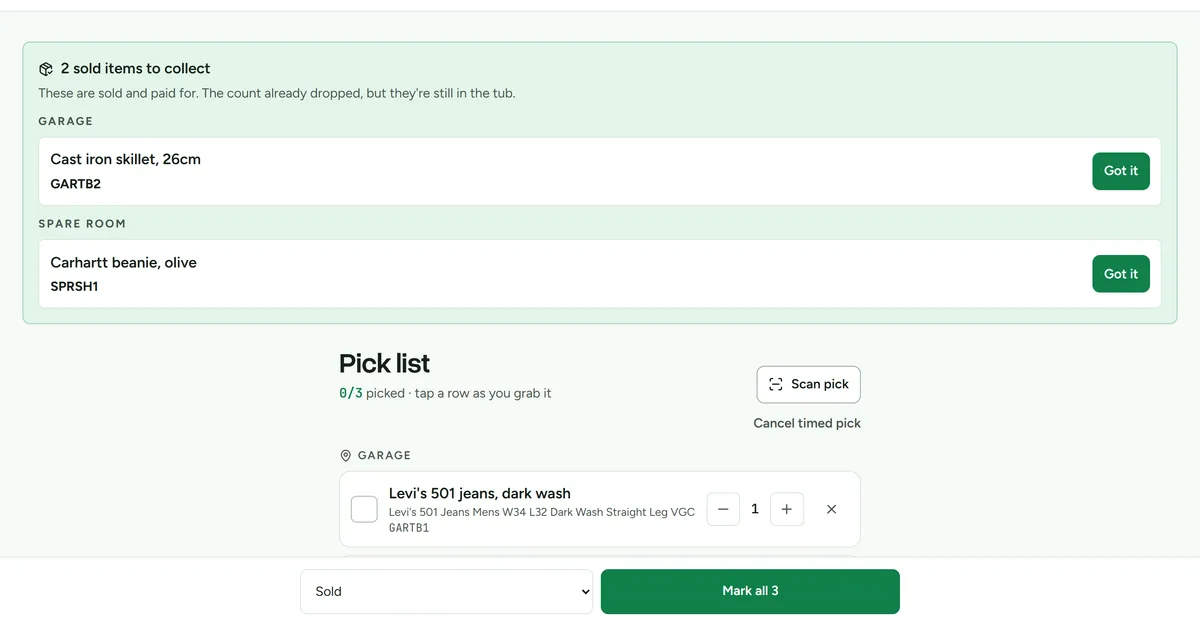 The pick list, grouped by location so one trip collects everything.
Start one picking run
Confirming a marketplace sale removes its quantity from stock and adds the physical collection to Pick. Items you add from Stock wait there too.
- Open Pick and review the confirmed sales and manual items waiting there.
- Choose Start picking or Start with scanner.
- Work through the fixed run in storage order. Anything added after you start waits for the next run.
- Check a row, or scan its item and storage labels, once the item is in your hands.
- Choose Finish N picked.
Selling three of five creates one collection row for three units and leaves the other two in stock. A missing tub does not hide the job. It appears under Location missing.
Finishing a confirmed-sale row only marks the collection complete and adds a zero-quantity pick confirmation to History. It does not deduct stock again. If the sale is cancelled before collection, the row cannot be finished. If it was already collected, a refund does not put it back in the tub.
Build the list
- Open Stock.
- Select Add on each item you need to retrieve.
- Open Pick.
- Review the quantities and storage locations before starting.
Finish selected rows
- Start the pick run.
- Work through items in the storage order shown.
- Retrieve the physical item, or scan its labels.
- Check only the rows you have actually collected.
- If selected manual rows need a stock outcome, choose Sold, Donated or Discarded.
- Select Finish N picked. Unpicked rows stay in the run and their source queues.
The outcome selector applies only to selected manual rows. Confirmed marketplace sales were already deducted when the sale was confirmed. Different manual outcomes can be finished as separate batches. If another action collects, cancels or changes a row first, that row stays visible with the reason while the other rows can still finish.
Progress is stored on the run, so refreshing the page or opening Pick on another signed-in device recovers the active run.
Measured pick time
Deathpile records server timestamps, item count, mode, result, and duration for a run. It only presents a time-saved estimate after enough qualifying retrieval evidence exists, and never converts that estimate into money.