Review sales, returns, and relists
Sales is the review workspace for detected sales, cancellations, refunds, returns, and relists.
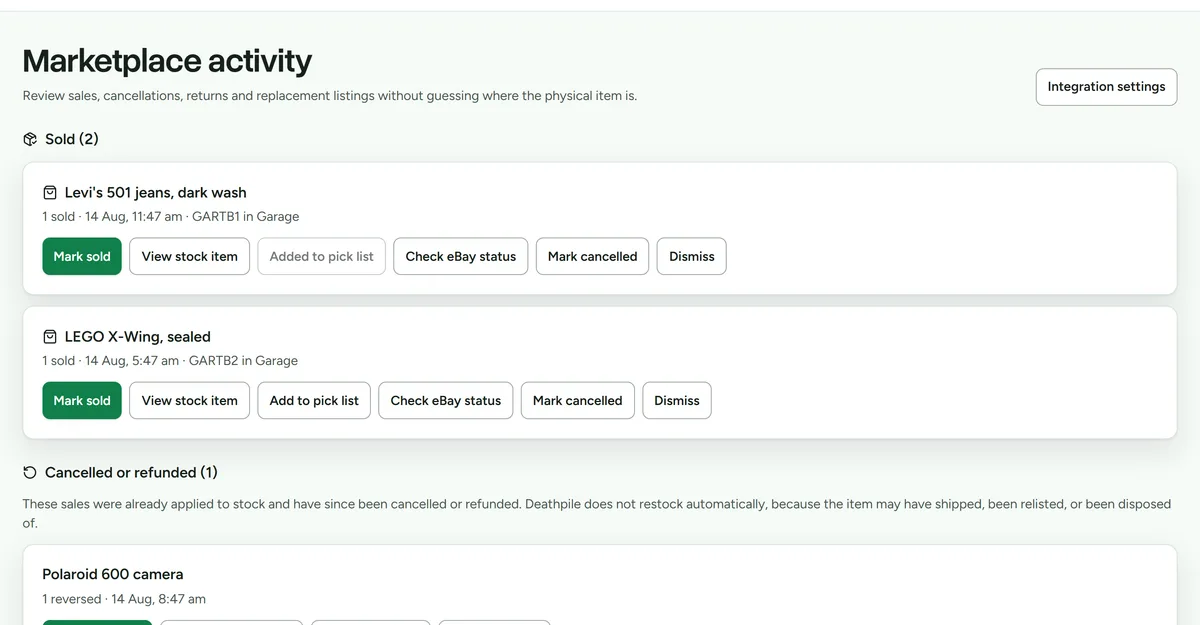 Sales that still need a decision stay in view. Exact fulfilled matches can be applied automatically.
Confirm a detected sale
- Open Sales and review anything still waiting.
- Confirm that the signal matches the correct Deathpile item and quantity.
- Choose Confirm sale when the match is safe. This removes the sold quantity and creates collection work in Pick.
Deathpile reads orders rather than assuming a listing quantity change means a sale. A paid fulfilled order can apply automatically when the match is exact and enough active stock remains. Anything uncertain stays open.
Sales that need a decision stay under Needs review. Unmatched sales offer Match stock and show the linked Deathpile item and quantity. If the listing never represented tracked stock, choose Wasn't in Deathpile. Provider checks, cancellation and Ignore sale sit under More actions because they are exceptions, not the normal path.
Once confirmed, the sale moves to Ready to collect. Open Pick when you are ready to fetch it. Collection is a separate physical fact and never deducts the stock a second time.
If an older pick-list workflow already recorded the stock movement but left the sale open, Sales may show Already recorded with the exact History event it found. Check both records before linking them. Deathpile only offers this when there is one unclaimed event with the same item and quantity. It does not guess or backfill older sales automatically.
Resolve another live listing
When applying a sale removes the last physical unit, Deathpile checks whether the same item is still linked to a live listing elsewhere. The resulting sibling-listing task remains visible until you resolve it.
- Review the marketplace and listing shown on the task.
- If the item still has genuine physical quantity, correct the stock record instead of ending the listing.
- Otherwise, end the listing directly on the marketplace and mark the task resolved, or turn on assisted listing removal and choose End listing.
- Confirm the task records whether Deathpile ended the listing, found it already inactive, or needs another attempt.
On Shopify, assisted removal moves the product to Draft so it can return to sale later. On eBay, ending a fixed-price listing is permanent and a later return requires a new or relisted listing. Deathpile never takes either action automatically.
Handle cancellation or refund activity
- Open the related activity in Sales.
- Review the provider status and the previously applied stock action.
- Follow the available resolution without assuming the item is physically back.
Receive a return
- Record that the returned item has arrived.
- Inspect its physical condition.
- Confirm the returned quantity.
- Choose the storage unit where you actually placed it.
- Restore stock.
Do not restore a return while it is still in transit. Physical stock is restored only after inspection and storage confirmation.
Reconnect a relisted item
Deathpile detects eBay relists through exact SKU or eBay parent metadata. If neither is available, select the correct listing manually. Deathpile never matches relists by title and does not create the listing on eBay.